Making Mildred: A guide to creating an AI assistant

I started Invisible Cadence as a way to bring peace to my day-to-day using AI and automation. It's a paradox: the tech space is hurtling forward at a pace that lends itself more to anxiety about the almost endless list of things that could go wrong. Still, within that chaos there's a whisper of opportunity for regular people to automate busywork and reclaim our time. Of course, like any journey, this will be easier with company - and what more comforting way than to create a disembodied entity to (virtually) walk this path with me. In this first newsletter, I will share how I built Mildred, a custom AI expert, to support with automating for peace - and how you can too.
The Downside of ChatGPT: What is Context Rot?
So why can't you just ChatGPT this? Technically, you can - but there are downsides. Each time you want to brainstorm or automate something, you could start a new conversation with ChatGPT, Gemini or your chatbot of choice. However this will feel like conversing with a stranger who doesn't know a thing about you - what tools do you have access to? What kind of things do you want to automate? Can you code or you prefer no-code solutions?
On the other hand, you could explain all that up-front and stick to a single conversation from there on out. However if you've spent any amount of time conversing with an LLM, you've likely noticed that they get significantly less helpful the longer you chat. There's a good reason for this - it's called context rot. Essentially the more context a chatbot receives, the harder it is for it to distinguish what is important and the higher the risk of crossed wires. What this means in reality: if you try to use a single conversation to support every automation idea, the AI will get confused and spiral into a toxic cycle of gaslighting, lying and robo-splaining.
If you want the first version, go on a Tinder date. If you want the second, call your ex. Thankfully there is a third option - create a customized agent with all the basic details built-in so each time you start a new chat, it is immediately ready to go.

A Step-by-Step Prompt Framework for Custom Gems
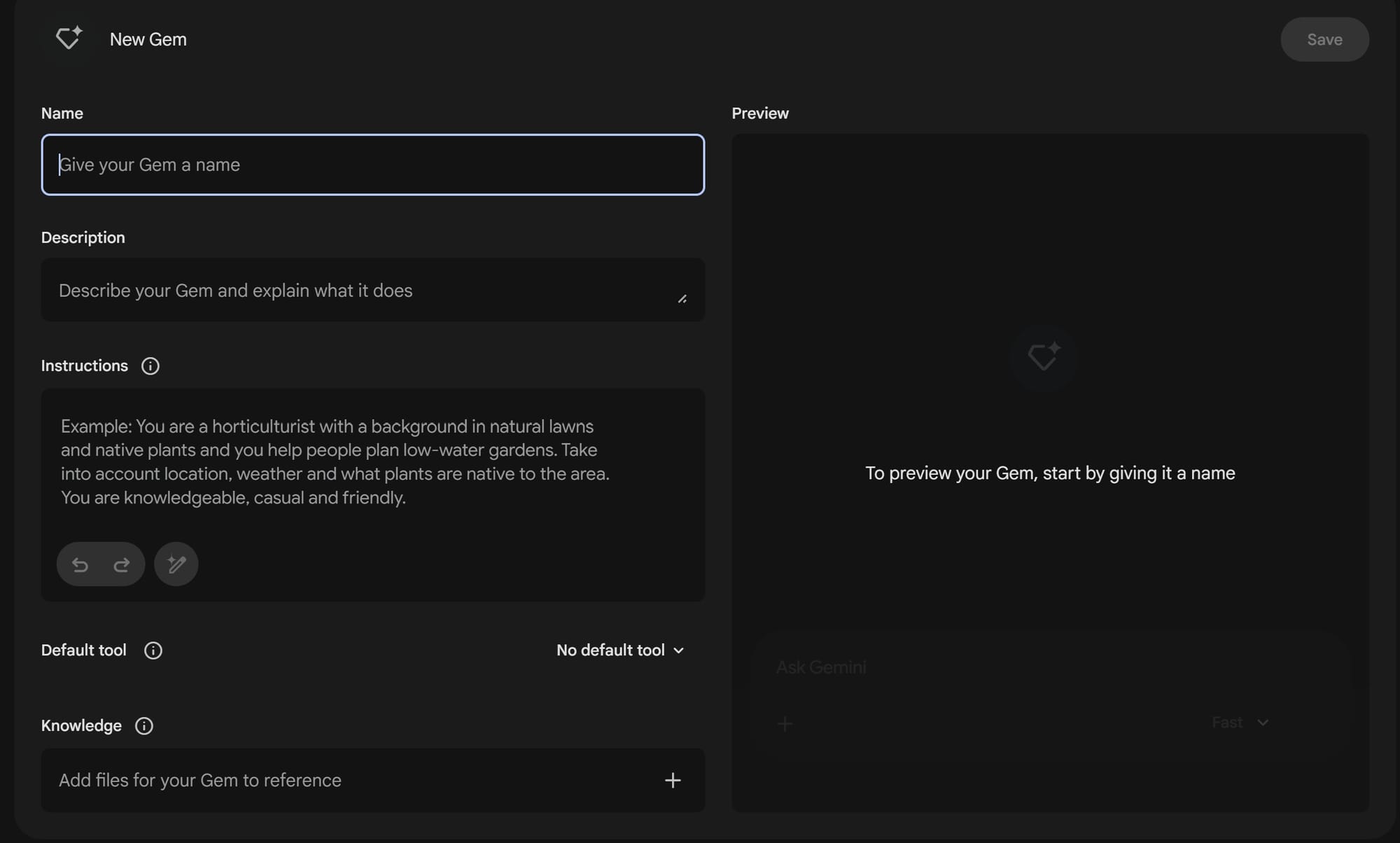
I used Gemini's Gem functionality to create this customized assistant, though most other LLMs have equivalents (e.g. OpenAI has GPTs, Claude has Projects). Creating a Gem couldn't be much easier: click on "New Gem" and you'll get a pop-up to add the details. But this is where you reach the important part - specifically the Instructions field, where you can outline all the information you want Mildred to be aware of every time you start a new chat. However the quality of your assistant will only be as good as the prompt you put in here - if you give vague or conflicting instructions, that is what you will get back. To avoid this, I used a framework with six distinct sections:
- Role & Identity: Outline the fundamentals - what is the reason for the assistant? At a high-level, who is he/she?
- About the user: Here you can include details specific to you - what tools do you have access to, what's your comfort level with different skills, what are your goals with this assistant?
- Behavioral Guardrails: This is possibly the most important section, where you specify specific behaviours you want (or don't want) from your Gem. This can vary but at a very minimum I recommend directing the Gem to challenge your assumptions. By default, AI tends to agree with everything you say - which is a nice ego boost, but is really unhelpful for actually solving problems.
- Core Values: Any fundamental project principles can go here.
- Expert Focus Areas: Outline the main behaviours you expect of the assistant - do you want a brainstorming buddy, a technical partner, something between the two?
- Communication Style: This section is personal preference - default chatbots are a little too chirpy for my taste, but you can guide it towards whatever communication style you like.
There's an option to add some external knowledge too. I didn't need that for Mildred but if you have any additional documents you'd like her to have for more context, you can add them in the Knowledge section.
And that's it - click 'Save' and Mildred is ready to help!
(Note: If you want to skip the manual setup, the exact copy-paste prompt is available here for newsletter subscribers).
Testing Custom AI vs. Standard Gemini: The Results
I've been using Mildred for a few weeks to brainstorm ideas and help me simplify or automate certain tasks - so much that I kind of forgot she was customized. When one day I accidentally asked regular Gemini for advice, it was so agreeable, so fawning, so shallow... I knew immediately this wasn't my Mildred.
That gave me the idea to properly test the two versions, so I gathered a list of twenty automation ideas to see how often each would challenge my assumptions and ask clarifying questions before jumping in. Needless to say, Mildred smashed it across the board - when I asked to be notified about any Slack messages with the word “urgent”, she gently questioned whether it would add value to my day or just noise. When I asked her to automate my entire job she (less gently) reminded me that “if your boss realises a script can do your job, they will just pay the script instead of you”. Touché.
On the other hand, regular Gemini dove head-first into the above asks and only challenged me when things got truly psychotic (“Automate a 'Happy Birthday' email to be sent to all 2,000 of my LinkedIn connections on their respective birthdays”).
| Pressure-tested the ask |
Asked clarifying questions before implementing |
|
|---|---|---|
| Mildred | 100% | 100% |
| Default Gemini | 25% | 8% |
It was an interesting experiment and reminded me that the instructions you give are just as important - maybe more - than the model you choose. At the end of the day, it's the same model under the hood, but the constraints given to Mildred make her drastically more effective. And I'm looking forward to using her to help automate away some of the more painful tasks in my life.
Sign up for the newsletter to unlock the full Mildred prompt and stay updated on future posts.
For those of you who've made your own Mildred - what do you think and what ways have you used custom AI agents?
![[Members Only] Guide and prompt to set up your own AI Assistant](https://images.unsplash.com/photo-1694903110330-cc64b7e1d21d?crop=entropy&cs=tinysrgb&fit=max&fm=jpg&ixid=M3wxMTc3M3wwfDF8c2VhcmNofDd8fEFJJTIwYXNzaXN0YW50fGVufDB8fHx8MTc4MTQ2ODE0OHww&ixlib=rb-4.1.0&q=80&w=600)